Yes — you can build a modern, fast, secure website for almost zero.
The only recurring cost you'll likely have is a domain (paid yearly). Hosting, CI, CDN, spam protection, small databases, and development email can all run on free tiers.
This article shows how we built this site, which services we used, a simple cost breakdown, and practical tips on usability, security, and maintenance. Plain language, no fluff.
What you'll need
- Domain name (Namecheap, Google Domains, or your preferred registrar).
- GitHub account + public repo.
- Vercel account (Hobby/free tier) for deployments.
- Cloudflare (optional) for DNS and Turnstile.
- Transactional email provider (Resend, SendGrid, Mailgun).
- Optional: Upstash or similar for tiny serverless storage.
- Local dev: Node.js and pnpm (or npm/yarn).
Tip: See the full integration details in the Website Blueprint: Integrations & Environment Variables.
Quickstart — get a site live in ~10 minutes
- Buy a domain.
- Create a public GitHub repo and add a Next.js + MDX starter.
- Connect the repo to Vercel and enable automatic deploys.
- Point the domain to Vercel or use Cloudflare DNS.
- Add Turnstile to forms and hook up a free email provider.
- Push content and preview — your site is live.
How we built this (short)
- Frontend: Next.js + MDX — content-as-code.
- Source control: GitHub — free public repos.
- Deployments: Vercel — automatic builds & previews.
- DNS & bot protection: Cloudflare + Turnstile.
- Serverless data: Upstash (free tier).
- Email: Resend / SendGrid / Mailgun (free tiers).
In short: MDX content in a GitHub repo, auto-deploys to Vercel, and a few free services. No server ops required — just a domain.
What services we use (and the real cost)
- GitHub — free for public repos.
- Vercel — Hobby tier for personal sites.
- Cloudflare — DNS, CDN, Turnstile on the free plan.
- Upstash — serverless storage for light usage.
- Resend / SendGrid / Mailgun — transactional email (free tiers).
Cost reality: if you stay within free-tier limits, monthly cost is $0. Expect only the domain (~$10–20/year).
Cost breakdown (simple)
- Domain: paid yearly (expect ~$10–20/yr).
- Everything else: free-tier services (0/month) for typical small sites.
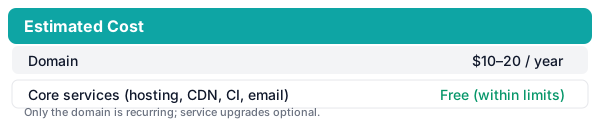
That means a professional, reliable website can cost less than your monthly coffee.
Quick cost example
- First year: Domain (~$12) + free services = ~$12.
- Typical ongoing: Domain yearly renewal (~$10–20). Optional upgrades only if you need more capacity.
When to upgrade (practical triggers)
- Build minutes or CI queues: if preview builds are delayed or blocked frequently, consider a paid CI/hosting tier.
- Bandwidth & traffic: when you see sustained traffic spikes or CDN bandwidth warnings, upgrade CDN/hosting.
- Serverless function invocation limits: heavy serverless usage -> move to paid plan or optimize functions.
- Email volume: when transactional/email volume exceeds free tier quotas, upgrade your mail provider.
- Key-value / KV rate limits: if Upstash returns throttling, move to a paid tier or switch to a managed DB.
When in doubt: check provider dashboards and alerts — upgrade when you hit quota limits or errors that affect users.
Troubleshooting & FAQ
- DNS changes not visible? DNS can take minutes to 48 hours. Verify DNS records with
digor DNS checkers and ensure no conflicting A/CNAME records at the registrar. - Site 404 after domain change? Ensure the domain is added to the Vercel project and the DNS is pointed correctly.
- Turnstile verification failing? Confirm
NEXT_PUBLIC_TURNSTILE_SITE_KEYandTURNSTILE_SECRET_KEYare correct and that server-side verification runs. Use test keys in dev. - Emails not arriving? Verify the provider API key, check sender domain verification (SPF/DKIM), and inspect bounce logs in the email dashboard.
- Build fails on Vercel with env errors? Ensure all required server env vars are set in the Vercel project (see the integrations article).
- Upstash 401/429 errors? Check tokens, use read/write separation, and monitor throttling; implement retries/backoff.
If you need help: check the runbooks in docs/runbooks/ for provider-specific remediation steps.
Accessibility & Performance checklist
- Add descriptive alt text for images and meaningful link text.
- Ensure semantic headings and logical heading order (H1 → H2 → ...).
- Make forms keyboard accessible and label inputs clearly.
- Aim for Lighthouse score >= 90 for performance and accessibility where possible.
- Optimize images (correct sizing, modern formats, lazy load).
- Reduce JavaScript where possible and prefer static generation for content pages.
One-page ops checklist (pre-release)
- Verify all production env vars are set in Vercel or CI.
- Confirm domain + HTTPS are working.
- Verify email sender domain (SPF/DKIM) and test send flows.
- Confirm Turnstile verification and form flows.
- Check Upstash connectivity and tokens.
- Ensure CI tests and nightly E2E (Playwright) are green.
Screenshots & visuals
Clone & deploy (one-click)
Import this repo into Vercel to deploy the site instantly:
Or clone locally:
git clone https://github.com/Lakshmanshenoy/shenoylabs-web.git
cd shenoylabs-web
pnpm install
pnpm build
PORT=3000 pnpm start
See the starter guide: examples/starter/README.md
Call to contribute
Want to help improve this guide or the starter? Fork the repo, make changes, and open a pull request. Contributions (content, accessibility fixes, docs) are very welcome.
For deep integration details and environment variables, see the Website Blueprint: Integrations & Environment Variables.
That wraps the practical guide — build, ship, iterate, and have fun.
Usability: friendly, fast, simple
- Prioritize readable content and clear headings.
- Use semantic HTML and accessible components.
- Serve static pages from a CDN for fast loads.
For non-technical editors: GitHub + Vercel previews or a lightweight CMS make contributions painless.
Security: small steps, big wins
- HTTPS is automatic on Vercel and Cloudflare.
- Verify Turnstile tokens on the server for forms.
- Keep secrets out of the repo — use platform env vars.
- Run regular dependency updates and basic PR reviews.
Reliability & maintenance
- Automatic deploys + Git history = easy rollbacks.
- CDN caching handles spikes for static pages.
- Monitor logs and run periodic tests for key flows.
- Prefer serverless stores over self-hosting for small stateful needs.
Maintenance checklist: update dependencies monthly and test critical flows after changes.
Want to do this now?
Follow the Quickstart above — that's your 10‑minute plan. Build, preview, iterate. If you need small storage or queues, add Upstash. Each service scales, and you only pay when you need more capacity.
Final note — keep it fun
Building something in public doesn't have to be expensive or complicated. Start small, choose free-tier tools that fit your workflow, and iterate. You’ll learn far more by shipping than by perfecting every detail behind closed doors.
This site is built the same way I just described — content in MDX, code on GitHub, automatic deploys to Vercel, and a handful of free services stitched together. Follow along via the published Projects and Articles.